Web-Based SPIKE Prime Control Documentation
This documentation describes how to setup and create interactive web-based interfaces
for controlling the SPIKE Prime.
It was originally created by Ethan Danahy in November and December 2020
for use by his first-year engineering course at Tufts University.
Setting up Airtable
See Canvas for instructions on creating an Airtable account.
To access your Airtable data remotely, you need three things:
- Your Airtable API Key (found under your Airtable Account settings); it should look like "keyXXXXXXXXXXXXX"
- Your Base ID (found under your REST API settings); it should look like "appYYYYYYYYYYYYYYY"
- The name of your table (e.g. "myProject" or "demo01" etc)
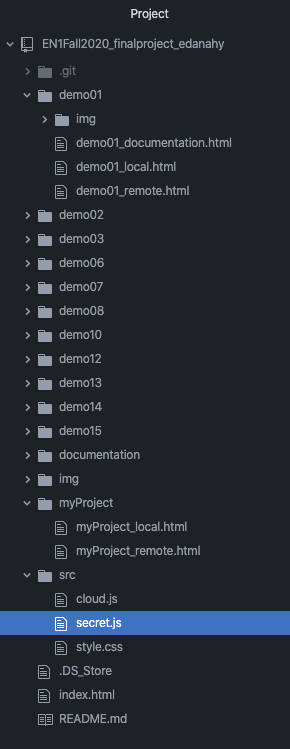
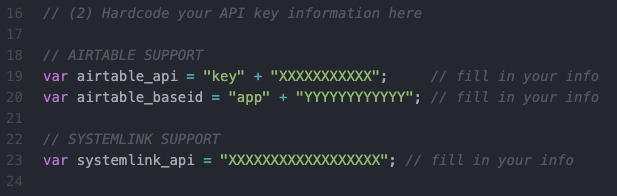
The Airtable API and the Base ID need to be entered into the "/src/secret.js" file.
Here is the location of that file in the folder structure:
Inside that file, you should be updating lines #19 (Airtable API Key) and #20 (Airtable Base ID):
Notes:
- You can see that the API key variable is "split" with "key" separated from the random string you've been assigned
- You can see that the Base ID variable is "split" with "app" separated from the random string you've been assigned
- Ignore the "SystemLink" portion of the page; we are using Airtable and not SystemLink for this project.
Then for each page you create (remote, local, etc) that you want to
access a data table within Airtable, you need to specify your Table Name.
Make sure you enter it into any/every page where you are connecting to Airtable.
Here is an example from myProject_remote.html showing that
the Airtable tablename of "myProject" has been entered into the ServiceDock on line 13.

Creating Remote File
The header of the Remote page needs to include the following:
- The ServiceDock code, hosted externally at cdn.jsdelivr.net.
- A reference to "secret.js" that has your Airtable API Key and Base ID information.
- Including all the code from "cloud.js" that renders the page and does all the cloud communication.
- Import in "style.css" that has some style sheet information.

In addition to these essential files, you can add to this head your own:
- Style information for formatting the document. This can use the
<style> tag.
- Custom JavaScript functions for creating an interactive interfaces. These can use a new
<script> tag. -
In the body of the document you need to include the Service Dock that performs the connection to Airtable.
Make sure you update the tablename to reference the table you want to use in your project.
Creating Local File
The header of the Local page needs to include the following:
- The ServiceDock code, hosted externally at cdn.jsdelivr.net.
- A reference to "secret.js" that has your Airtable API Key and Base ID information.
- Including all the code from "cloud.js" that renders the page and does all the cloud communication.
- Import in "style.css" that has some style sheet information.

In addition to these essential files, you can add to this head your own:
- Style information for formatting the document. This can use the
<style> tag.
- Custom JavaScript functions for creating an interactive interfaces. These can use a new
<script> tag. -
In the body of the document you need to include the Service Dock that
performs both the connection to Airtable as well as connecting to the SPIKE Prime.
- For Airtable: make sure you update the tablename to reference
the table you want to use in your project.
- For SPIKE Prime: make sure you are using a Chrome Browser and
activate the SPIKE Prime prior to your code running.

Reminder about SPIKE Prime:
To use the SPIKE™ Prime hardware, you must be using a recent version of the Google Chrome browser.
Examples
Additional documentation including examples coming soon.
For now: see the other demos and documentation
Project and Documentation created by Tufts Center for Engineering Education and Outreach:

For more information about Tufts CEEO, please visit: http://ceeo.tufts.edu
For other experimental projects from Tufts CEEO: CEEO Innovations